Guides
Secure File Exchange Between System A and System B
Scope: Bidirectional business-file exchange using OpenPGP/GPG for file-level protection and SFTP over SSH for transport.
Version snapshot: 15 July 2026. Product versions change; use a currently supported vendor build and confirm interoperability between both parties.
Infographic
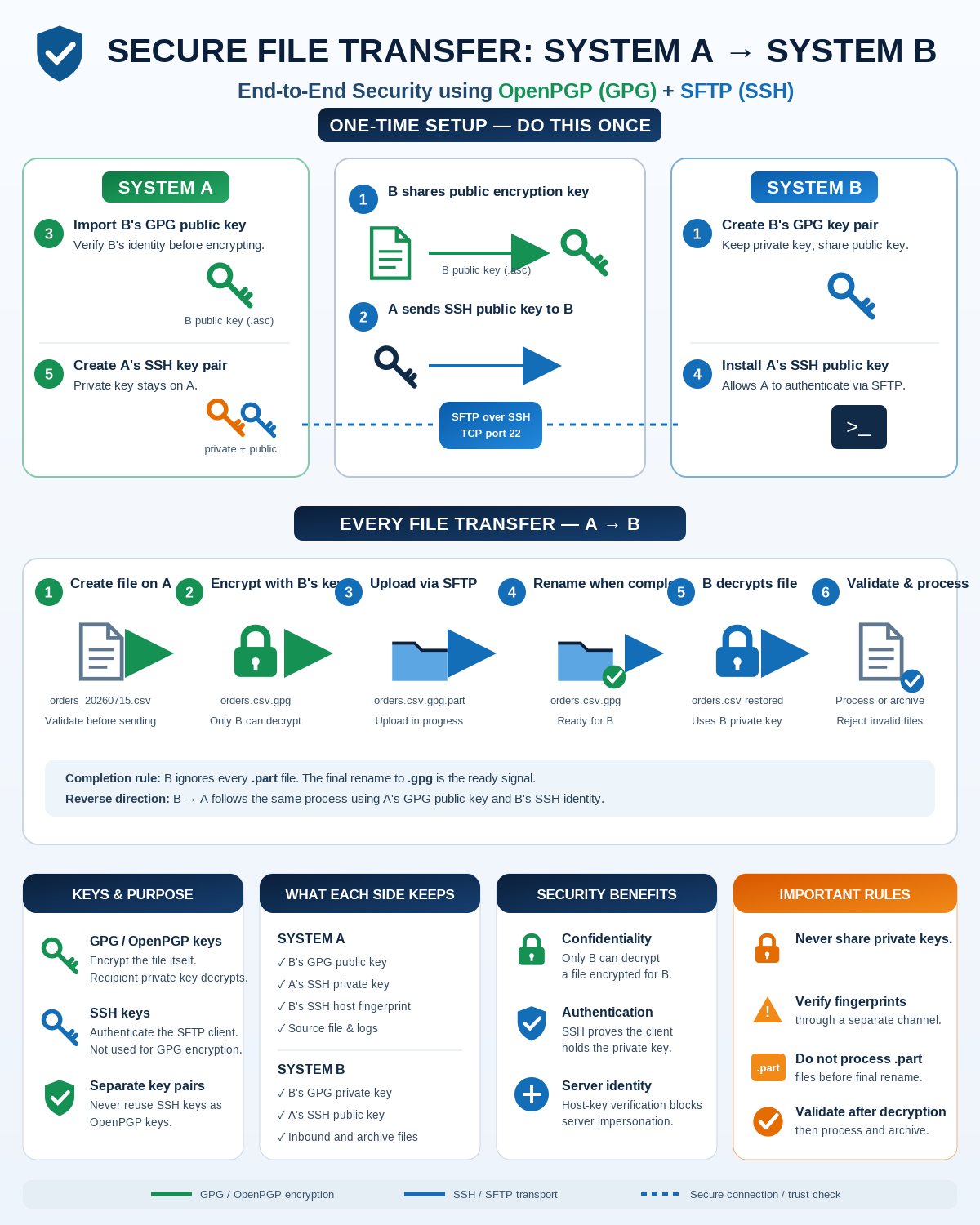
Click the infographic to view it at full size.
1. The setup in one picture
flowchart LR
    subgraph A[System A]
        A1[Create and validate file]
        A2[Encrypt with B's OpenPGP public key]
        A3[Authenticate with A's SSH private key]
    end

    subgraph T[Secure transport]
        T1[SFTP over SSH]
        T2[Upload as .part]
        T3[Rename to final .gpg]
    end

    subgraph B[System B]
        B1[Receive completed .gpg file]
        B2[Decrypt with B's OpenPGP private key]
        B3[Validate, process and archive]
    end

    A1 --> A2 --> A3 --> T1 --> T2 --> T3 --> B1 --> B2 --> B3
The design has two independent security layers:
| Layer | Technology | What it protects |
|---|---|---|
| File/content layer | OpenPGP, commonly implemented with GPG/GnuPG | The file itself before upload, while stored, in backups and after download until decrypted |
| Transport/access layer | SFTP over SSH | The live connection, server identity and client authentication during transfer |
[!IMPORTANT] Use separate key pairs for SSH authentication and OpenPGP file encryption. Never copy a private key to the other organisation.
2. Key concepts
RSA key
RSA is a public-key cryptographic algorithm. An RSA key pair contains:
- Public key: may be shared.
- Private key: remains secret with its owner.
For an A → B file:
- A encrypts for B using B’s public key.
- B decrypts using B’s private key.
For a signed file:
- A signs using A’s private key.
- B verifies using A’s public key.
RSA does not have a product-like “RSA version.” The current RSA cryptography specification is PKCS #1 v2.2 / RFC 8017. Key length is configured separately, such as RSA 3072 or RSA 4096.
OpenPGP
OpenPGP is the standard that defines how keys, encrypted data, signatures and related packets are represented and processed. The modern IETF standard is RFC 9580. It replaces RFC 4880 and adds version 6 (v6) keys.
GnuPG does not follow RFC 9580 by default. GnuPG implements RFC 4880 and the separate LibrePGP specification. GnuPG does not create v6 keys, and its v5 keys are not RFC 9580 v6 keys. Version 4 (v4) keys work in both GnuPG and RFC 9580 products.
GPG / GnuPG
GnuPG, usually invoked with the gpg command, is software that implements OpenPGP.
OpenPGP = standard and file/key format
GPG     = software used to create keys, encrypt, decrypt, sign and verify
SSH and SFTP
- SSH provides an encrypted, authenticated network connection.
- SFTP is a secure file-transfer subsystem that runs over SSH.
- The normal TCP port is 22, although another agreed port may be used.
- SFTP is not the same as FTP or FTPS.
3. What each side needs
System A requirements
| Item | Why A needs it | Where it belongs |
|---|---|---|
| B’s OpenPGP public key | Encrypt files that only B can decrypt | A’s GPG keyring |
| Verified B OpenPGP fingerprint | Confirm that the imported key really belongs to B | Onboarding record / key inventory |
| A’s SSH private key | Authenticate to B’s SFTP server | A only; protected file, agent, vault or HSM |
| A’s SSH public key | Registered by B for the SFTP account | B’s authorized_keys or managed SFTP configuration |
| B’s SSH host-key fingerprint | Confirm A is connecting to the correct server | A’s known_hosts and onboarding record |
| SFTP host, port and username | Establish the connection | A’s secure configuration |
| Remote inbound folder | Destination for A’s outbound files | Agreed with B |
| File contract | Filename, format, schedule, size and validation rules | Shared interface agreement |
| Retry and acknowledgement rules | Determine what happens after failure or success | Shared operating procedure |
System B requirements
| Item | Why B needs it | Where it belongs |
|---|---|---|
| B’s OpenPGP private key | Decrypt files addressed to B | B only; protected keyring, vault or HSM |
| B’s OpenPGP public key | Shared with A for encryption | Distributed through approved onboarding process |
| A’s SSH public key | Authenticate A’s connection | B’s SFTP account configuration |
| B’s SSH host private key | Prove the SFTP server’s identity | B’s SSH/SFTP server only |
| B’s SSH host public fingerprint | Supplied to A through an independent trusted channel | Onboarding record |
| SFTP account and folder | Receive A’s encrypted files | B’s server |
| Decryption and validation process | Recover and validate the original business file | B’s processing environment |
| Archive/reject directories | Separate successful, duplicate and failed files | B’s controlled storage |
| Monitoring and support contacts | Detect and resolve missed transfers | Shared operations process |
For B → A, reverse the roles: A creates an OpenPGP key pair and shares A’s public key with B; B uses its own SSH identity to connect to the agreed SFTP destination.
4. Component, version and algorithm matrix
| Component | Recommended selection | Compatibility / lifecycle guidance |
|---|---|---|
| SSH protocol | SSH-2 | Mandatory. Do not enable SSH-1. |
| OpenSSH software | Current security-supported vendor release | Upstream OpenSSH 10.4/10.4p1 was released 6 July 2026. A supported OS-packaged release may be older but patched. |
| SFTP | SFTP over SSH | Protocol details are negotiated. OpenSSH commonly uses SFTP v3 plus extensions; do not hard-code a version unless a product requires it. Use the interactive version command to inspect a session. |
| Network port | TCP 22 by default | A custom port is acceptable when both sides and firewalls agree. |
| SSH user authentication key | Ed25519 | Preferred for a new OpenSSH-to-OpenSSH integration. |
| SSH RSA fallback | RSA 3072 or 4096, using RSA/SHA-2 signatures | Use only where Ed25519 is unavailable. Do not depend on legacy ssh-rsa SHA-1 signatures. |
| SSH server host key | Ed25519; RSA/SHA-2 as compatibility fallback | A must verify the fingerprint independently before first use. |
| SSH key exchange | Let supported modern defaults negotiate | Current OpenSSH supports modern hybrid post-quantum key exchange. Do not force a single algorithm without a compatibility/security review. |
| GPG software | Current supported GnuPG 2.5.x or later supported line | Upstream stable was 2.5.21 on 2 July 2026. Upstream GnuPG 2.4 reached end of life on 30 June 2026. Vendor-supported packages may have different lifecycle dates. |
| OpenPGP standard | RFC 9580, used with v4 keys | Replaces RFC 4880 as the IETF standard. GnuPG follows RFC 4880 and LibrePGP by default. GnuPG 2.5.23 and later can process some RFC 9580/9980 data only with the opt-in --allow-9980 option. |
| OpenPGP key packet version | v4 | RFC 9580 defines v4 and v6. GnuPG does not create or use v6 keys, so use v4 when either side uses GnuPG. Use v6 only when both products support it and an end-to-end test passes. Avoid v3 keys. |
| OpenPGP public-key algorithm | RSA 3072 for broad enterprise compatibility | Straightforward choice when product compatibility is more important than key size/performance. |
| Modern OpenPGP alternative | X25519 encryption subkey with an Ed25519 signing key | Use only after an end-to-end interoperability test. Names and support vary between products and key formats. |
| RSA specification | PKCS #1 v2.2 / RFC 8017 | This is the specification version, not a key “algorithm version.” |
| RSA key length | 3072 bits recommended; 4096 accepted; 2048 compatibility minimum | Follow organisational cryptographic policy and planned data lifetime. Avoid keys below 2048 bits. |
| File-content cipher | AES-256 | OpenPGP normally generates a random symmetric session key and encrypts that session key for the recipient. AES-128 is also considered secure and may be negotiated. |
| Hash | SHA-256 or SHA-512 | Avoid MD5 and SHA-1 for new signatures/integrity choices. Version-4 OpenPGP fingerprints internally use SHA-1 by format definition; this does not mean SHA-1 should be selected for new signatures. |
| Encrypted file format | Binary OpenPGP, .gpg or .pgp |
Binary is compact. Use .asc only when ASCII-armoured output is required. |
| Upload-in-progress suffix | .part |
B must ignore .part files. Rename to the final .gpg name only after upload finishes. |
| SSH/OpenPGP fingerprints | Full SHA-256 SSH fingerprint and full OpenPGP fingerprint | Verify through a second trusted channel, not through the same email that carried the key. |
Recommended simple profile
SSH protocol:             SSH-2
SFTP:                     SFTP over SSH, TCP 22
SSH client key:           Ed25519
SSH host key:             Ed25519
GPG:                      Supported GnuPG 2.5.x+
OpenPGP standard:         RFC 9580
OpenPGP key format:       v4 (GnuPG does not use v6 keys)
OpenPGP key algorithm:    RSA 3072 for broad compatibility
File-content cipher:      AES-256
Hash/signature digest:    SHA-256 or SHA-512
Completed file:           orders_YYYYMMDD.csv.gpg
Temporary upload:         orders_YYYYMMDD.csv.gpg.part
5. Information A and B must agree before implementation
| Area | Required decision |
|---|---|
| Hosting model | B hosts SFTP, A hosts SFTP, or a shared managed SFTP service |
| Direction | A → B, B → A, or both |
| Connectivity | Hostname, TCP port, DNS, proxy/jump host and source IP allow-list |
| Accounts | Username for each sending party; whether accounts are chrooted/SFTP-only |
| SSH keys | Key type, key owner, fingerprint, expiry/rotation process |
| OpenPGP keys | Public key, full fingerprint, algorithm, key size, expiry and revocation process |
| Folders | Upload, download, archive, rejection and quarantine paths |
| Filename | Naming pattern, case sensitivity, timestamp/time zone, sequence number |
| File format | CSV/XML/JSON/fixed-width/ZIP; delimiter, encoding and line endings |
| Delivery completion | .part then atomic rename, or a separate trigger/control file |
| Schedule | Frequency, cut-off time and permitted delivery window |
| Size | Maximum file size and expected record volume |
| Duplicate handling | Filename uniqueness and business-level duplicate detection |
| Validation | Required columns, schema, checksums, record counts and business rules |
| Acknowledgement | ACK/NACK filename or API/email notification process |
| Retry | Retry count, delay, backoff and escalation threshold |
| Retention | How long encrypted originals, plaintext and logs are kept |
| Monitoring | Missing-file alert, failed-decryption alert and SFTP authentication alert |
| Support | Business and technical contacts, support hours and severity process |
| Time | Agreed time zone, preferably explicit UTC timestamps in machine filenames |
6. One-time setup: A sends files to B
Step 1 — B creates an OpenPGP key pair
Run on System B:
gpg --full-generate-key
A broad-compatibility selection is:
Key type: RSA signing/certification key with an RSA encryption subkey
Key size: 3072 bits
Expiry:   Organisation-defined, commonly 1–2 years with planned rotation
Identity: System B <system-b@example.com>
| Aspect | Detail |
|---|---|
| What it does | Creates B’s OpenPGP public and private key material. |
| Expected result | GPG reports that public and secret keys were created. |
| Verify | gpg --list-keys system-b@example.com and gpg --list-secret-keys system-b@example.com |
| If it fails | Check whether GPG is installed, ~/.gnupg ownership/permissions, entropy and terminal access. |
| If missed | B cannot provide a public encryption key and cannot decrypt files sent to it. |
Display the full fingerprint:
gpg --fingerprint system-b@example.com
Create and securely store a revocation certificate if the tool does not create one automatically:
gpg --output system-b-revocation.asc \
    --gen-revoke system-b@example.com
Store the revocation certificate separately from the active private key.
Step 2 — B exports its OpenPGP public key
gpg --armor \
    --export system-b@example.com \
    > system-b-public-key.asc
| Aspect | Detail |
|---|---|
| What it does | Writes B’s public key to a text-formatted .asc file. It does not export B’s private key. |
| Expected result | system-b-public-key.asc exists and is non-empty. |
| Verify | test -s system-b-public-key.asc && head -n 1 system-b-public-key.asc |
| Expected verification | First line is -----BEGIN PGP PUBLIC KEY BLOCK-----. |
| If it fails | Run gpg --list-keys and export by the exact full fingerprint. |
| If missed | A has no key with which to encrypt files for B. |
B sends the public key to A. B communicates the full fingerprint through a separate trusted channel.
[!WARNING] Never export or send B’s secret key using
gpg --export-secret-keysas part of this integration.
Step 3 — A imports and verifies B’s public key
Run on System A:
gpg --import system-b-public-key.asc
gpg --fingerprint system-b@example.com
| Aspect | Detail |
|---|---|
| What it does | Adds B’s public key to A’s keyring. |
| Expected result | GPG reports that B’s public key was imported or was already present. |
| Verify | Compare the complete displayed fingerprint character by character with the fingerprint B supplied independently. |
| If import fails | no valid OpenPGP data found usually means the file is empty, damaged or not a public-key export. |
| If fingerprint differs | Stop. Do not encrypt or send a file. Obtain the correct key/fingerprint from B. |
| If missed | Encryption fails with No public key, or an operator may accidentally choose a wrong key. |
For automation, use the full verified fingerprint, not only the email address or short key ID.
B_GPG_FINGERPRINT="REPLACE_WITH_B_FULL_VERIFIED_FINGERPRINT"
In a dedicated integration keyring, --trust-model always may be used in a non-interactive encryption command only after the fingerprint has been independently verified. It bypasses GPG’s web-of-trust prompt; it does not replace identity verification.
Step 4 — A creates an SSH authentication key pair
Run on System A:
install -d -m 700 "$HOME/.ssh"

ssh-keygen \
    -t ed25519 \
    -f "$HOME/.ssh/a_to_b_sftp" \
    -C "System A to System B SFTP"
Files created:
~/.ssh/a_to_b_sftp       Private key — remains on A
~/.ssh/a_to_b_sftp.pub   Public key  — supplied to B
| Aspect | Detail |
|---|---|
| What it does | Creates A’s SSH client identity for SFTP authentication. |
| Expected result | ssh-keygen confirms both paths and prints a fingerprint. |
| Verify | ls -l ~/.ssh/a_to_b_sftp* and ssh-keygen -lf ~/.ssh/a_to_b_sftp.pub |
| Expected permissions | Private key normally 600; .ssh directory 700. |
| If file already exists | Do not overwrite a production key until its current usage and rotation plan are known. |
| If missed | A cannot authenticate to B’s SFTP server using public-key authentication. |
Correct permissions:
chmod 700 "$HOME/.ssh"
chmod 600 "$HOME/.ssh/a_to_b_sftp"
chmod 644 "$HOME/.ssh/a_to_b_sftp.pub"
A supplies only a_to_b_sftp.pub to B.
Step 5 — B registers A’s SSH public key
For a traditional OpenSSH account, run as the correct SFTP user on System B:
install -d -m 700 "$HOME/.ssh"
cat a_to_b_sftp.pub >> "$HOME/.ssh/authorized_keys"
chmod 600 "$HOME/.ssh/authorized_keys"
| Aspect | Detail |
|---|---|
| What it does | Allows a client possessing A’s matching private key to authenticate as the configured SFTP user. |
| Expected result | A’s complete public-key line appears once in authorized_keys. |
| Verify | grep -F "System A to System B SFTP" ~/.ssh/authorized_keys and check ownership/permissions. |
If login says Permission denied (publickey) |
Check username, installed key, line wrapping, ownership, permissions and server authentication policy/logs. |
| If missed | A cannot log in. |
A managed SFTP platform may provide a portal/API instead of authorized_keys; the principle is the same.
Recommended server-side restrictions for a dedicated account include SFTP-only access, an assigned inbound directory, no shell, no port forwarding and least-privilege filesystem permissions.
Step 6 — A verifies B’s SSH host key
B’s administrator supplies the expected host-key fingerprint through an independent trusted channel.
A can retrieve the key presented by the endpoint:
ssh-keyscan \
    -p 22 \
    -t ed25519 \
    sftp.system-b.example.com \
    > /tmp/system-b-host-key

ssh-keygen -lf /tmp/system-b-host-key
| Aspect | Detail |
|---|---|
| What it does | Retrieves and displays the host key currently presented by the endpoint. |
| Expected result | A SHA-256 fingerprint is displayed. |
| Verify | Compare it with B’s independently supplied host-key fingerprint. |
| If no key is returned | Check hostname, port, DNS, firewall, source-IP allow-list and whether SSH/SFTP is running. |
| If fingerprints differ | Stop. It may be the wrong endpoint, an unannounced key rotation or an interception/misconfiguration. |
| If missed | A may connect to an unverified or incorrect server. |
ssh-keyscan retrieves a key but does not prove its authenticity. Only add it after out-of-band verification:
cat /tmp/system-b-host-key >> "$HOME/.ssh/known_hosts"
chmod 600 "$HOME/.ssh/known_hosts"
Step 7 — B prepares folders and permissions
Example on System B:
mkdir -p /incoming/system-a/{archive,rejected,quarantine}
The exact owner and mode depend on whether the SFTP account is chrooted and whether a separate application account performs decryption.
| Aspect | Detail |
|---|---|
| What it does | Creates controlled locations for inbound, archived and failed files. |
| Expected result | A can write and rename in the inbound location; B’s processor can read completed files. |
| Verify | Test cd, ls, upload, rename and removal using a non-sensitive test file. |
| If permission denied | Correct account ownership, ACLs, chroot paths or managed-SFTP policy. |
| If missed | Login may work while upload or rename fails. |
Step 8 — A tests the SFTP connection
sftp \
    -i "$HOME/.ssh/a_to_b_sftp" \
    -P 22 \
    -o BatchMode=yes \
    -o IdentitiesOnly=yes \
    -o StrictHostKeyChecking=yes \
    system_a@sftp.system-b.example.com
At the prompt:
pwd
ls
cd /incoming/system-a
pwd
version
bye
| Aspect | Detail |
|---|---|
| What it tests | DNS, network, host-key verification, SSH authentication, SFTP subsystem and folder access. |
| Expected result | Connected to ..., no password prompt, and successful cd. |
| Verify | Confirm the remote path and SFTP protocol version shown by version. |
| Timeout | Usually firewall, route, proxy, allow-list, wrong host or wrong port. |
| Connection refused | SSH service is not listening on the selected host/port. |
Permission denied (publickey) |
Wrong username/private key or public key not correctly registered. |
| Folder permission error | B must correct directory path or permissions. |
| If missed | The first production delivery becomes the connectivity test. |
Use verbose diagnostics only when needed:
sftp -vvv \
    -i "$HOME/.ssh/a_to_b_sftp" \
    -P 22 \
    system_a@sftp.system-b.example.com
7. Every-file transfer: A → B
Step 9 — A creates and validates the source file
Example:
cat > orders_20260715.csv <<'CSV'
order_id,customer,amount
1001,Customer One,125.50
1002,Customer Two,75.25
CSV
Verification:
test -s orders_20260715.csv
head -n 5 orders_20260715.csv
wc -l orders_20260715.csv
| Aspect | Detail |
|---|---|
| What it does | Produces the agreed business file. |
| Expected result | Correct filename, non-zero size, expected header and record count. |
| If invalid | Stop before encryption. Move to a local error area and notify the source application/owner. |
| If missed | Encryption fails because the source file does not exist, or an empty/invalid file may be delivered. |
Recommended pre-send checks include schema, encoding, delimiter, line endings, date format, maximum size, uniqueness and a business-level record count.
Step 10 — A encrypts the file using B’s public key
SOURCE_FILE="orders_20260715.csv"
ENCRYPTED_FILE="${SOURCE_FILE}.gpg"
B_GPG_FINGERPRINT="REPLACE_WITH_B_FULL_VERIFIED_FINGERPRINT"


gpg \
    --batch \
    --yes \
    --trust-model always \
    --output "$ENCRYPTED_FILE" \
    --encrypt \
    --recipient "$B_GPG_FINGERPRINT" \
    "$SOURCE_FILE"
| Aspect | Detail |
|---|---|
| What it does | Encrypts the file with a random symmetric session key and protects that session key for B’s OpenPGP public key. |
| Expected result | orders_20260715.csv.gpg is created and non-empty. |
| Verify | test -s "$ENCRYPTED_FILE" and gpg --list-packets "$ENCRYPTED_FILE" |
No public key |
B’s key is missing or the fingerprint is incorrect. |
Unusable public key |
The selected encryption subkey may be expired, revoked or unsuitable. Obtain B’s replacement key. |
| Source missing | Correct the source path; do not create/send a placeholder. |
| If missed | Uploading plaintext removes file-level protection and may breach the interface’s security requirements. |
Do not “test decrypt” on A using B’s private key—A must not possess B’s private key. Decryption testing is performed by B in a non-production onboarding test.
Step 11 — A uploads using .part, then renames
SFTP_HOST="sftp.system-b.example.com"
SFTP_PORT="22"
SFTP_USER="system_a"
REMOTE_DIR="/incoming/system-a"
SSH_KEY="$HOME/.ssh/a_to_b_sftp"
FILE="orders_20260715.csv.gpg"

sftp \
    -b - \
    -i "$SSH_KEY" \
    -P "$SFTP_PORT" \
    -o BatchMode=yes \
    -o IdentitiesOnly=yes \
    -o StrictHostKeyChecking=yes \
    "$SFTP_USER@$SFTP_HOST" <<SFTP
cd "$REMOTE_DIR"
put "$FILE" "${FILE}.part"
rename "${FILE}.part" "$FILE"
ls -l "$FILE"
bye
SFTP
| Aspect | Detail |
|---|---|
| What it does | Transfers the encrypted file under a temporary name and atomically exposes the final name after completion. |
| Expected result | SFTP reaches 100%, rename succeeds, final ls shows orders_20260715.csv.gpg, and command exit code is 0. |
| Verify | Capture the exit code and optionally reconnect to list the final file. |
Connection lost during put |
A .part file may remain. B must ignore it. Retry according to the agreed overwrite/cleanup policy. |
| Rename fails | Check folder permissions, existing final filename and server rename policy. |
| Remote disk full/quota | B frees capacity; A retries without changing the business filename unless agreed. |
| If missed | B never receives the file. If the rename step is missed, B should not process the .part file. |
Batch mode (-b -) causes important failed commands such as put, rename, cd and ls to abort the transfer with a non-zero status.
Verify immediately:
status=$?
if [ "$status" -ne 0 ]; then
    echo "SFTP transfer failed with status $status" >&2
    exit "$status"
fi
Step 12 — B detects and verifies the completed encrypted file
INPUT="/incoming/system-a/orders_20260715.csv.gpg"

test -s "$INPUT" || {
    echo "Encrypted input is missing or empty" >&2
    exit 1
}
| Aspect | Detail |
|---|---|
| What it does | Ensures B processes only the completed final filename and not an incomplete upload. |
| Expected result | Final .gpg file exists with a non-zero size; no corresponding .part is selected. |
| Verify | ls -lh "$INPUT"; optionally compare expected filename/size/record metadata from a control file or acknowledgement contract. |
Only .part exists |
Transfer did not finish or rename failed. Wait/retry/escalate; do not decrypt it. |
| Zero-byte final file | Quarantine and reject. |
| If missed | B may attempt to decrypt a missing, empty or incomplete file. |
Step 13 — B decrypts using B’s private key
INPUT="/incoming/system-a/orders_20260715.csv.gpg"
OUTPUT="/incoming/system-a/orders_20260715.csv"
TEMP_OUTPUT="${OUTPUT}.part"

if [ -e "$OUTPUT" ] || [ -e "$TEMP_OUTPUT" ]; then
    echo "Output or temporary output already exists" >&2
    exit 1
fi

if gpg --batch --output "$TEMP_OUTPUT" --decrypt "$INPUT"; then
    mv "$TEMP_OUTPUT" "$OUTPUT"
else
    rm -f "$TEMP_OUTPUT"
    echo "Decryption failed" >&2
    exit 1
fi
| Aspect | Detail |
|---|---|
| What it does | Finds B’s matching private key, decrypts to a temporary plaintext file, then renames only after success. |
| Expected result | GPG exits 0; orders_20260715.csv exists and is non-empty. |
| Verify | test -s "$OUTPUT", inspect the header, and retain GPG status/log output. |
No secret key |
A encrypted to the wrong key, B is using the wrong GPG home/user, or B’s private key is not installed. |
| Passphrase prompt/failure | Configure an approved non-interactive mechanism such as gpg-agent, a protected service account, smart card/HSM or enterprise key manager. Never hard-code a passphrase in the script. |
| Corrupt/incomplete data | Quarantine the encrypted original and request retransmission after checking transfer completion. |
| If missed | B cannot access the business content. |
An expired private key can normally decrypt files encrypted to it, but A should not use an expired public encryption key for new deliveries.
Step 14 — B validates the decrypted file
Example header validation:
EXPECTED_HEADER="order_id,customer,amount"
ACTUAL_HEADER="$(head -n 1 /incoming/system-a/orders_20260715.csv)"

if [ "$ACTUAL_HEADER" != "$EXPECTED_HEADER" ]; then
    echo "Invalid CSV header" >&2
    exit 1
fi
| Aspect | Detail |
|---|---|
| What it does | Confirms that successful decryption produced a valid business file. |
| Expected result | Filename, schema, encoding, record counts and business rules pass. |
| If invalid | Stop processing; preserve the encrypted original; move plaintext to rejection/quarantine; create a NACK with a safe error reason. |
| If missed | Malformed or duplicate data may reach downstream systems. |
Decryption success proves that B possessed the required private key and the OpenPGP message was readable. It does not prove the CSV/XML/JSON content is correct.
Step 15 — B processes, archives and acknowledges
Example:
mkdir -p /data/processing /incoming/system-a/archive

mv /incoming/system-a/orders_20260715.csv \
   /data/processing/

mv /incoming/system-a/orders_20260715.csv.gpg \
   /incoming/system-a/archive/
| Aspect | Detail |
|---|---|
| What it does | Separates ready-to-process plaintext from the immutable encrypted original and clears the inbound folder. |
| Expected result | Business processing completes once; encrypted original is archived according to retention policy. |
| Verify | Record filename, size, timestamps, checksum/record count, processing outcome and acknowledgement ID. |
| Move/process failure | Do not mark success. Retry safely or quarantine without creating duplicates. |
| If missed | The inbound folder accumulates files and duplicate processing becomes more likely. |
B returns an agreed ACK/NACK, for example:
ACK_orders_20260715.txt
NACK_orders_20260715.txt
The acknowledgement should avoid exposing sensitive row-level data. Include a correlation ID, original filename, status, timestamp and safe reason code.
8. Robust A-side transfer script
#!/usr/bin/env bash
set -euo pipefail

SOURCE_FILE="${1:?Usage: $0 <source-file>}"
B_GPG_FINGERPRINT="REPLACE_WITH_B_FULL_VERIFIED_FINGERPRINT"
SFTP_HOST="sftp.system-b.example.com"
SFTP_PORT="22"
SFTP_USER="system_a"
REMOTE_DIR="/incoming/system-a"
SSH_KEY="$HOME/.ssh/a_to_b_sftp"
ENCRYPTED_FILE="${SOURCE_FILE}.gpg"

fail() {
    printf 'ERROR: %s\n' "$*" >&2
    exit 1
}

[[ -f "$SOURCE_FILE" ]] || fail "Source file does not exist: $SOURCE_FILE"
[[ -s "$SOURCE_FILE" ]] || fail "Source file is empty: $SOURCE_FILE"
[[ -r "$SOURCE_FILE" ]] || fail "Source file is not readable: $SOURCE_FILE"
[[ -f "$SSH_KEY" ]] || fail "SSH private key is missing: $SSH_KEY"

# Refuse to overwrite an earlier encrypted output silently.
[[ ! -e "$ENCRYPTED_FILE" ]] || fail "Encrypted output already exists: $ENCRYPTED_FILE"

gpg \
    --batch \
    --yes \
    --trust-model always \
    --output "$ENCRYPTED_FILE" \
    --encrypt \
    --recipient "$B_GPG_FINGERPRINT" \
    "$SOURCE_FILE"

[[ -s "$ENCRYPTED_FILE" ]] || fail "Encrypted output is missing or empty"

sftp \
    -b - \
    -i "$SSH_KEY" \
    -P "$SFTP_PORT" \
    -o BatchMode=yes \
    -o IdentitiesOnly=yes \
    -o StrictHostKeyChecking=yes \
    -o ConnectTimeout=30 \
    "$SFTP_USER@$SFTP_HOST" <<SFTP
cd "$REMOTE_DIR"
put "$ENCRYPTED_FILE" "$(basename "$ENCRYPTED_FILE").part"
rename "$(basename "$ENCRYPTED_FILE").part" "$(basename "$ENCRYPTED_FILE")"
ls -l "$(basename "$ENCRYPTED_FILE")"
bye
SFTP

printf 'SUCCESS: encrypted and transferred %s\n' "$SOURCE_FILE"
Operational refinements for production:
- Write structured logs without file contents or secrets.
- Add a unique correlation ID.
- Implement bounded retries with backoff for network errors.
- Do not retry permanent errors such as invalid keys, revoked keys or failed schema validation without intervention.
- Move locally sent files to a sent/archive folder only after the SFTP command succeeds.
- Protect against two jobs sending the same filename concurrently.
- Run under a dedicated service account with restrictive permissions.
9. Robust B-side receive/decrypt outline
#!/usr/bin/env bash
set -euo pipefail

INPUT="${1:?Usage: $0 <encrypted-file.gpg>}"
OUTPUT_DIR="/data/processing"
QUARANTINE_DIR="/incoming/system-a/quarantine"
ARCHIVE_DIR="/incoming/system-a/archive"

[[ "$INPUT" == *.gpg ]] || {
    echo "Refusing non-.gpg input: $INPUT" >&2
    exit 1
}

[[ -s "$INPUT" ]] || {
    echo "Encrypted input is missing or empty: $INPUT" >&2
    exit 1
}

mkdir -p "$OUTPUT_DIR" "$QUARANTINE_DIR" "$ARCHIVE_DIR"

base="$(basename "$INPUT" .gpg)"
temp="$OUTPUT_DIR/${base}.part"
output="$OUTPUT_DIR/$base"

[[ ! -e "$temp" && ! -e "$output" ]] || {
    echo "Output already exists for $INPUT" >&2
    exit 1
}

if ! gpg --batch --output "$temp" --decrypt "$INPUT"; then
    rm -f "$temp"
    mv "$INPUT" "$QUARANTINE_DIR/"
    echo "Decryption failed; encrypted file quarantined" >&2
    exit 1
fi

[[ -s "$temp" ]] || {
    rm -f "$temp"
    mv "$INPUT" "$QUARANTINE_DIR/"
    echo "Decrypted output is empty" >&2
    exit 1
}

# Insert schema and business validation here before publishing the output.
mv "$temp" "$output"
mv "$INPUT" "$ARCHIVE_DIR/"

echo "SUCCESS: decrypted $output"
Do not archive as “successful” until validation and the required business processing stage have completed.
10. Optional signing: prove who created the file
Encryption answers:
Who can read the file?
A digital signature additionally answers:
Which key created/signed this file, and has the signed content changed?
For A → B with sign-and-encrypt:
- A keeps A’s OpenPGP signing private key.
- B imports and verifies A’s OpenPGP public key.
- A signs with A’s private key and encrypts for B’s public key.
- B decrypts with B’s private key and verifies with A’s public key.
Example on A:
gpg \
    --batch \
    --yes \
    --trust-model always \
    --local-user "$A_SIGNING_FINGERPRINT" \
    --recipient "$B_ENCRYPTION_FINGERPRINT" \
    --sign \
    --encrypt \
    --output orders_20260715.csv.gpg \
    orders_20260715.csv
B must check that GPG reports a good signature from the exact expected A fingerprint. A “good signature” from an unknown or unverified key is not sufficient.
SFTP account authentication identifies the account that connected, but an OpenPGP signature travels with the file and can be independently verified after download or from an archive.
11. Common errors and responses
| Error / symptom | Most likely cause | Response |
|---|---|---|
gpg: command not found |
GnuPG is not installed or not in PATH |
Install an approved supported package and confirm gpg --version. |
No public key |
Recipient key not imported or wrong fingerprint | Import B’s public key and verify the full fingerprint. |
Unusable public key |
Encryption subkey expired/revoked/unsupported | Obtain and verify B’s replacement key. |
No secret key |
Wrong recipient key or private key/keyring unavailable on B | Compare recipient key ID/fingerprint and B’s service account/GPG home. |
Permission denied (publickey) |
SSH public-key authentication failed | Check username, private key, registered public key, ownership and permissions. |
REMOTE HOST IDENTIFICATION HAS CHANGED |
Host key changed or endpoint differs | Stop; verify the change with B. Update known_hosts only after approval. |
Connection timed out |
Firewall, route, allow-list, DNS or wrong port | Test DNS and TCP reachability; check source IP and firewall policy. |
Connection refused |
No SSH service on that endpoint/port | Confirm host, port and service status. |
SFTP Permission denied on put |
Folder/ACL/chroot policy does not allow write | Correct B-side account permissions. |
| Upload succeeds, rename fails | No rename permission or target exists | Correct policy; decide duplicate/overwrite behaviour. |
.part remains |
Interrupted transfer or failed rename | B ignores it; A retries/cleans up under the agreed policy. |
| Decrypted output empty | Empty original, corruption or unexpected message | Quarantine and investigate; do not process. |
| Duplicate filename | Retry or upstream duplicate | Use idempotency rules; do not silently overwrite. |
| GPG works interactively but not in scheduler | Different user, GNUPGHOME, agent, TTY or permissions |
Run under the intended service account and explicitly manage environment/key access. |
12. Key lifecycle and security rules
Private-key rules
- Never email, upload or share an SSH or OpenPGP private key with the other party.
- Restrict private-key filesystem permissions.
- Prefer a secrets manager, key vault, hardware token or HSM where the environment supports it.
- Protect OpenPGP private keys with an approved passphrase and
gpg-agent/hardware-backed mechanism. - Do not log private keys, passphrases, decrypted file contents or command-line secrets.
- Back up required decryption keys securely; losing B’s private key may make archived encrypted files unrecoverable.
Rotation
Agree on:
- New public key delivery date.
- Independent fingerprint verification.
- Overlap period where both old and new keys can decrypt.
- Sender cut-over date.
- Test-file confirmation.
- Old-key retirement date.
- Archived-data decryption requirement.
Do not delete an old private decryption key until retention and legal/business requirements confirm that no stored file still requires it.
Emergency revocation
If a private key may be compromised:
- Stop transfers using the affected identity.
- Revoke/disable the key or SFTP account.
- Distribute and verify a replacement key.
- Review authentication and transfer logs.
- Determine which files/data may have been exposed.
- Resume only after a controlled test.
13. Logging, monitoring and alerts
Record at minimum:
- Correlation ID.
- Direction: A → B or B → A.
- Original and encrypted filename.
- File size and safe checksum where agreed.
- Creation, encryption, upload, receipt, decryption and processing timestamps.
- SSH destination/account, but not private-key material.
- OpenPGP recipient fingerprint/key ID.
- Result and safe error code.
- Retry count.
- ACK/NACK status.
Alert on:
- Expected file not received by cut-off.
- Repeated SFTP authentication failures.
- Host-key mismatch.
- Encryption/decryption failure.
- Expired or soon-to-expire keys.
- Stale
.partfiles. - Zero-byte or malformed files.
- Duplicate deliveries.
- Low disk space/quota.
- Processing or acknowledgement delay.
14. Onboarding and testing checklist
Connectivity
- Correct SFTP hostname and port.
- A’s source IP allow-listed where required.
- DNS resolves from A’s runtime environment.
- TCP connection succeeds.
- Proxy/jump-host requirement documented.
SSH/SFTP
- A’s SSH public key registered on B.
- A’s private key remains only on A.
- B’s host-key fingerprint verified independently.
StrictHostKeyChecking=yesworks non-interactively.- Correct remote folder is accessible.
- Upload and rename permissions tested.
- Account is restricted to required SFTP paths/actions.
OpenPGP/GPG
- B’s public key imported on A.
- Full OpenPGP fingerprint verified independently.
- Key algorithm, packet version and expiry recorded.
- A successfully encrypts a test file.
- B successfully decrypts the test file.
- If signing is required, B validates A’s exact signing fingerprint.
- Key rotation and revocation contacts/process documented.
File contract
- Filename pattern agreed.
- File format/schema agreed.
- Character encoding and line endings agreed.
- Maximum file size and record count agreed.
.part/final-name completion rule tested.- Duplicate behaviour tested.
- Invalid-file rejection tested.
- ACK/NACK tested.
- Retention and deletion rules approved.
Failure tests
- Wrong SSH private key.
- Wrong SSH hostname/host key.
- Firewall blocked.
- Wrong OpenPGP recipient key.
- Expired/revoked OpenPGP key.
- Interrupted upload leaving
.part. - Remote disk full/quota exceeded.
- Empty file.
- Invalid schema.
- Duplicate filename.
- Decryption service account cannot access key.
- Retry does not create duplicate business processing.
15. Version and capability commands
Run on both systems as applicable:
# OpenSSH client version
ssh -V

# GnuPG version and supported algorithms
gpg --version

# SSH key types supported by the local OpenSSH client
ssh -Q key

# SSH key-exchange algorithms
ssh -Q kex

# SSH ciphers
ssh -Q cipher

# SSH message authentication codes
ssh -Q mac

# Inspect an SSH public-key fingerprint
ssh-keygen -lf ~/.ssh/a_to_b_sftp.pub

# List OpenPGP public and private keys
gpg --list-keys --keyid-format LONG
gpg --list-secret-keys --keyid-format LONG

# Display a full OpenPGP fingerprint
gpg --fingerprint system-b@example.com

# Inspect OpenPGP packet structure without decrypting
gpg --list-packets file.csv.gpg
Do not require A and B to run identical product patch versions. Require a supported version and prove interoperability with an onboarding test covering key import, encryption, SFTP upload/rename, decryption, validation and acknowledgement.
16. Sources and standards
- OpenSSH release notes
- OpenSSH specifications
- OpenBSD
sftp(1)manual - GnuPG downloads and lifecycle
- RFC 4251 — SSH Protocol Architecture
- RFC 4252 — SSH Authentication Protocol
- RFC 4253 — SSH Transport Layer Protocol
- RFC 8017 — PKCS #1 v2.2 / RSA
- RFC 9580 — OpenPGP
- NIST SP 800-57 Part 1 Rev. 5 — Key Management
Final summary
SSH keys authenticate the SFTP connection.
SSH host keys authenticate the SFTP server.
OpenPGP keys encrypt and optionally sign the business file.
Public keys are exchanged and fingerprints are verified independently.
Private keys never leave their owner.
Upload under .part and rename only after completion.
Decrypt, validate, process once, archive and acknowledge.